

Payments on Shopify are one of the most critical aspects of your online business. If you sell on Shopify for a while, the platform offers users various payment options. Ultimately, the goal is to make a smooth payment for sellers and buyers.
Shopify is an excellent platform because it works with different payment gateways. The options are Apple Pay, Google Pay, traditional credit card payments, and Shopify Payments.
If you are a business looking for the best payment methods, here is the ultimate guide to your payment methods on Shopify.
Let’s dive in!

Shopify Payments
Shopify Payments is a payment gateway to receive and process online payments on Shopify stores. The payment gateway was launched in 2013 in partnership with Stripe. It enables merchants to process payments online without needing any third-party providers. It’s fully integrated with Shopify’s ecosystem.
Unlike traditional payment methods, getting approval from is simple. The setting-up process is straightforward and doesn’t require any advanced coding skills. You can integrate Shopify Payments over 100 other payment options, such as Apple Pay, Google Pay, and Amazon Pay.
When using Shopify Payments, you will pay a transaction fee every time a transaction takes place. It will cost you 2.4-2.9% + $0.30 after every transaction you have.
Benefits of Using Shopify Payments
Streamlined Checkout: Online shoppers can pay without being redirected to a third-party payment processor.
Easy to Set Up & Manage: Setting up Shopify Payments is straightforward. You don’t need to wait for a long time to get approval. You can also manage orders, shipping inventory, and refunds from one dashboard.
Security: Shopify Payments is certified at Level 1 PCI DSS, which makes credit card transactions secure. You can also protect your store against fraudulent payments.
How does Shopify Payments Work?
Ensure Your Bank Meets Shopify’s Requirements
Before connecting your bank account, you must ensure it meets Shopify’s requirements. Your bank account must use the same currency in your region and accept electronic payments. Remember that Shopify doesn’t allow saving accounts, virtual accounts, or money-transferring services.
After confirming your bank account, you must determine your store’s currency. It’s the currency in which your products’ prices are.
Activate Shopify Payments
From your Shopify Admin page, go to Settings and then click Payments. Next, activate Shopify Payments. If you are setting up a payment provider for the first time, you can Complete the Account Setup.
Enter Business Details
After activating your Shopify Payments, you need to fulfill your business information. This information includes your business type, business number, business address, and Employee Identification Number(EIN).
Also, Shopify requires you to enter your personal information. This regulatory process allows companies to fulfill their details to identify their sellers.
Make a Test
The last step is to test a transaction so that you can see how customers will process orders. To do this, you need to enable test mode. To do it:
Go to Settings >Payments>Shopify Payments.
Click Manage.
Go to the Test Mode section at the bottom and select Enable Test Mode.
After testing, turn off test mode because your customers can’t pay with an actual credit card in this mode.
Recommended Reading: Guide to Shopify Analytics [+Google Analytics Updates 2023]
Focus on Your Pricing
Did you know that 17% of shoppers abandon their cart during the checkout because payment process was too complex?
Your checkout is crucially important to your customers. But also your pricing strategy plays a crucial role here. You must develop a well-designed pricing strategy for your online business that meets your customers willingness to pay.
You can work with pricing tools on Shopify App store. They can help you track your competitors’ prices, offer competitive pricing, and increase your profits.

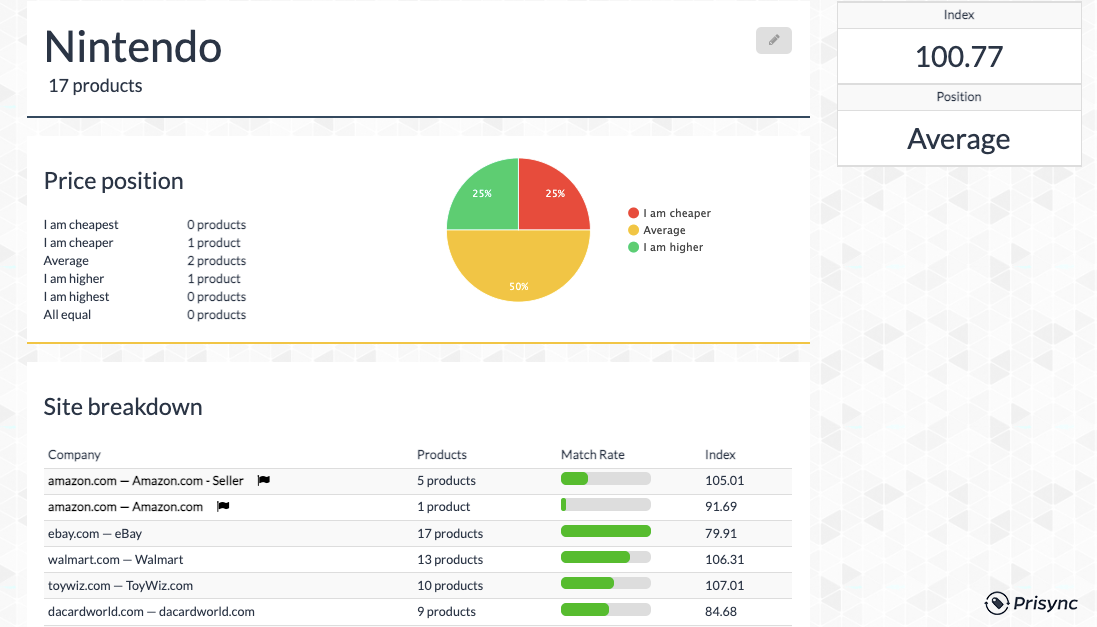
Dynamic pricing optimization app allows you to track prices in one dashboard and import all your products with a single click. You will streamline your checkout process and get more customers in checkout with dynamic pricing optimization.
Best Payment Methods for Shopify Stores
The payment methods you can use for your Shopify Store are the following:
- Shopify Payments (also known as Shop Pay)
- Paypal
- Stripe
- Square
- Klarna
- AmazonPay
These are some of the best payment methods that work with Shopify. Each one has its own set of fees and features. Therefore please research before deciding which one fits your business.
Takeaways
Payments are one of the most critical aspects of your e-commerce business. It would help to work with a payment processor that works best for your business. You can work with Shop Pay; easy to use, secure, and streamlined. You can follow the steps we have listed above and activate Shop Pay. You can also work with other payment gateways but ensure that you do your research before deciding.

