

Finding the optimum prices for your products is not a straightforward and easy process. You need to have a really good mechanism that takes into calculation your costs, your target profit margin, the competition, demand in the market, etc.
However, as evaluating all these factors at the same time is a bit challenging, there are many different strategies for pricing. Such as cost-based pricing, premium pricing, penetration pricing, or such other strategies. This post will be about cost-based pricing and how to apply it with Prisync‘s Dynamic Pricing Module.

Cost-based pricing is simply adding a certain percentage or amount of markup to your products’ internal costs to find your prices. This is the simplest method among different pricing strategies to find which level a product should be priced at. See the cost-based pricing example below.
Product Cost: $160
Profit Margin Goal: 25%
Sales Price: 160 + (160*25/100) = $200
So, $200 is our minimum sales price that satisfies our target profit margin. Besides the cost plus approach, take into the calculation of your competitors’ prices in the market to see if this is really the best price that you can have. For example, if your cheapest competitor sells this product at $239, I think you shouldn’t wait at $200. You have an opportunity to increase your prices until $238 by still staying the cheapest and having more profit. Let me explain, how to apply these strategies thanks to our Dynamic Pricing Module.
Dynamic Pricing Module and Cost-based Pricing Rules
With this module, you’re able to add your product costs to your products that you track in your Prisync account. See it how a product cost looks like in your dashboard.
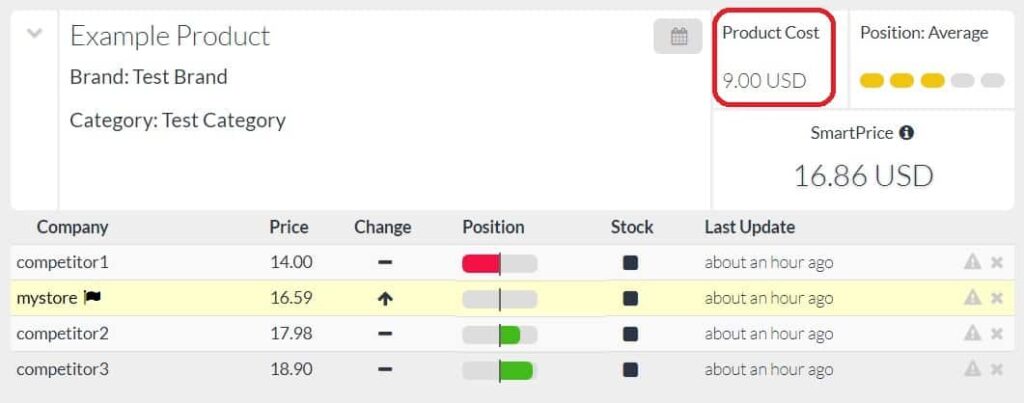
After adding your costs to your products, it’s time to find your SmartPrices. They should based on your costs, your competitors’ prices and your target profit margins. You can easily set the pricing rules in the Dynamic Pricing page. In this page, first pick up the product range that you want to apply to the pricing rule and then create your rule.
The rule can be based on just your competitors’ prices or both your costs and your competitors’ prices. Let’s get started with the first one which is simpler. So, to set up a rule-based on just your competitors’ prices, you have three options like;
-my price should be equal to the cheapest, average or the highest price in the market.
For example, if you have a price-match promise to your customers and want to keep them happy, you can set up a rule like my price should be equal to the cheapest. (see it below)

Apart from this, include your costs and target profit margins to the rules to find smarter prices for your products. For this, you can pick up the first option and create your rule.
For example, you can define a rule like;
My price should be lower 2% than cheapest of my competitors but it shouldn’t be lower than my cost + 20% profit margin. (see it below)

After setting up your rules, you can immediately see the effects of these rules under SmartPrice Live View Section. If the SmartPrices that the system suggests make sense for you, save the rule and start seeing the SmartPrices in the products page, in your excel reports and also in your API.
To sum up, with our Dynamic Pricing Module, you can apply a cost-based pricing strategy and find the SmartPrices for your products. Try to connect these outputs into your internal systems via our API and even have a fully automated re-pricing system! If you’re interested in building such a mechanism, try for free all these features for 14 days from here!


