
Daily Email Reporting
Get your price alerts delivered to your inbox with our Daily Email Reporting feature. Send these reports to as many email addresses as you need and stay informed about your competitors’ price movements every day, any day. Plus, break down the details of your reports via brand or category analysis.
- No credit card required
- 14-day free trial
Prisync sends daily price change emails, keeping you updated even if you can’t log in frequently. You can set five different types of notifications from your panel: Price Change, where you can set a threshold to receive alerts for specific price changes; Excel & CSV Reports, which send detailed spreadsheets to your preferred email; Favorite Products, notifying you of price changes for selected items; Stock Change, providing daily updates on stock variations and MAP Monitoring, available in the Platinum Plan, alerting you if resellers list prices below your recommended price.
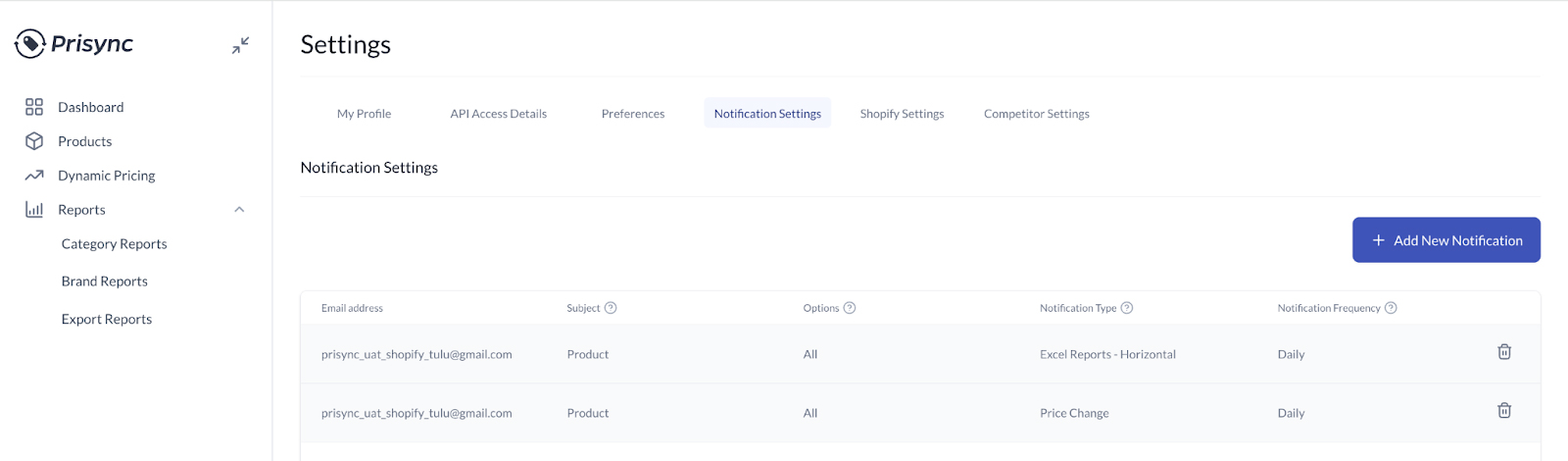
Receive notifications emails about compeititor price changes!
We’ve got more for you to check out!

Frequently Asked Questions
What information is included in the daily summary email?
The daily price summary email includes the following details: product names, your prices, your market position, and whether your products are priced as the cheapest, average, or highest. Also, you can view your competitors’ prices, the cheapest and highest-priced websites, and stock changes. Also, if you have set up SmartPrice rules, your daily emails will also include smart price suggestions.
Can I customize the layout of my daily reports?
While visual layout is standard, you can configure the data you receive for specific collections, categories, or brands. Or, if you set up threshold rules, you can choose to be notified only about specific price changes. This way, you can only receive information that matters most to your business strategy.
Can I send daily reports to my sales or procurement team?
Yes, you can! You can share your daily reports with your team or others outside your organization. You can add as many email addresses as needed in the Notification Settings tab. There are no limitations on the number of email addresses you can add to receive these daily reports. All you need to do is click ‘Add New Notification’ and enter the email addresses for the desired report. Also, if your company has team members responsible for different categories or brands, this feature lets each person receive notifications relevant to their specific area, whether it’s for individual products, collections, categories, or brands.
Is the daily report mobile-friendly?
Yes, users can easily see old and current prices, price changes, and stock information at a glance in daily reports.
Want to get in touch? Ask anything to us!
This feature is precious if you’re on the go and want an overview of your data.